Let me walk you through an audit assignment I recently worked on, where I used Claude Cowork to analyse the finance data of a growing services company.
The setup was fairly typical for a fast-growing business. Around 35 contractors across different countries, four active clients, and roughly $40,000 in monthly payouts.
The company had scaled quickly, but the finance side was still heavily manual – invoicing, validations, payment checks, everything. The founders knew something was off with the numbers, but they couldn’t pinpoint where the problem was or how much it was costing them.
I worked with a dataset that included seven interconnected tabs: vendor rosters, platform-logged hours, invoiced hours, payment records, client billing, and cost structures.
The objective was straightforward: identify the issues, quantify the financial impact, and put together a report the founders could actually use.
*(The specifics – names, numbers, and identifying details – have been changed to maintain confidentiality. The nature of the findings and the process are real.) *
Anyone who has worked in accounting knows how this kind of exercise usually goes. You open the workbook, start matching IDs across sheets, build VLOOKUPs, run reconciliation checks, create pivots, and keep moving back and forth between tabs trying to make sure nothing gets missed. It’s important work, but it’s also repetitive and mentally exhausting when the data starts getting large.
This time, I chose to approach it differently. I used Claude Cowork alongside my own review process.
A Quick Word on Claude Cowork
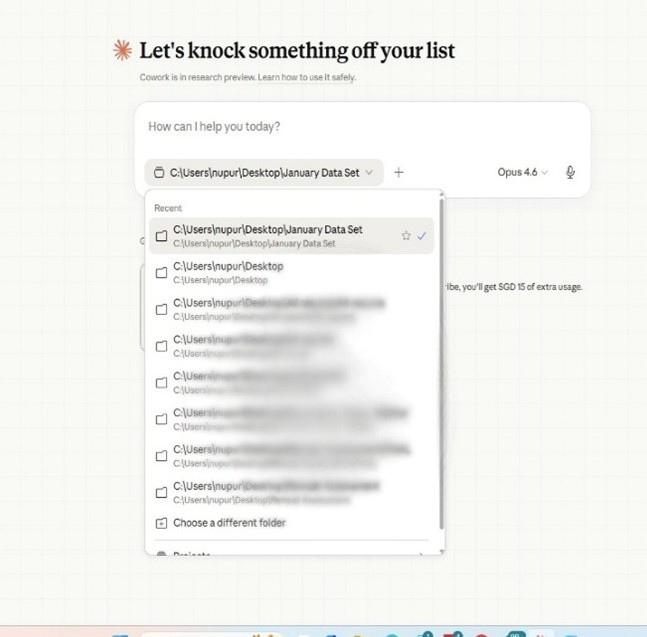
For those unfamiliar – it’s Anthropic’s desktop tool where Claude Cowork works directly on your files. You connect a folder (see the screenshot below), and it reads your spreadsheets, runs scripts, cross-references data, and generates outputs.
No copy-pasting into a chat window.
Think of it as a very fast analyst sitting next to you who never loses track of which tab they were on.
How the Audit Worked
I want to be clear about one thing: I didn’t just hand over the data and wait for Claude Cowork to do the work. I was running my own checks simultaneously – the way any accountant would. Roster matching, duplicate detection, hours reconciliation.
I wanted to keep my own judgment and experience as the base, and see whether Claude Cowork would arrive at similar findings.
Normally, the first pass through a dataset like this takes time. You spend a good while understanding how the tabs connect, tracing data flows, and figuring out where inconsistencies might sit.
Claude Cowork handled that part in a few minutes and immediately flagged that the vendor count in the payment ledger didn’t match the roster. I had already started noticing the same issue manually.
But here’s what surprised me. Claude Cowork didn’t just confirm my findings – it went further. It picked up things that a human eye, scanning rows one by one, would very likely miss. A lot of the findings matched mine.
But Claude Cowork also picked up things that would have been easy to miss manually.
What We Found
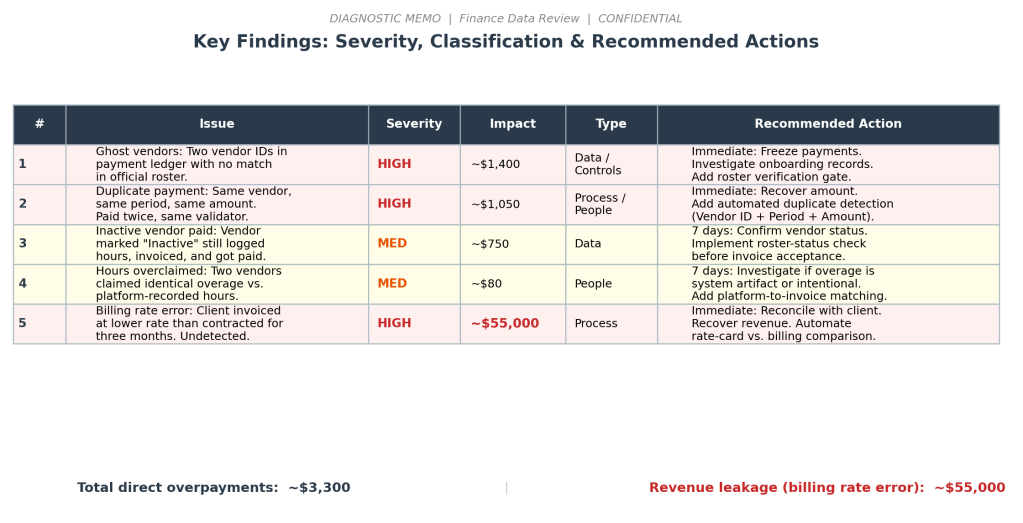
The overpayments themselves were relatively small. The bigger issue was the billing error.
For three months, one client had been invoiced at rates lower than what had actually been agreed in the contract. Nobody had caught it because nobody was consistently checking billed rates against contracted rates. That single issue alone had a revenue impact of more than $55,000!
There was also a wider mismatch between platform-tracked work and client billing, which meant the margin reporting the company relied on wasn’t fully reliable either.
The Output
The final report ranked the issues by severity, quantified the financial impact, and separated findings into data gaps, process gaps, and control failures.
Claude Cowork helped accelerate the analysis significantly, but the final decisions – what to prioritise, what to simplify, what needed attention immediately, and what could wait – came from experience.
What Claude Cowork Did Well – And What It Couldn’t Do
One thing Claude Cowork did particularly well was handling volume.
It cross-referenced all seven tabs together, checked patterns across months, and flagged anomalies quickly. For example, it identified a vendor reporting the exact same hours repeatedly over multiple months – the kind of pattern that can easily slip past someone manually reviewing spreadsheets for long periods.
In a normal workflow, catching something like that means building a separate comparison sheet, adding variance formulas and scanning for zeros. But Claude Cowork surfaced it while doing the rest of the analysis.
Where it still fell short was turning those findings into something the founders would actually sit down and read. Claude Cowork could find everything and even sort it by type, whether it was a data issue, a process gap, or a people problem.
What it couldn’t do was decide what belongs on page one and what goes in an appendix of this audit report. It kept repeating context. It buried urgent findings behind paragraphs of background.
It didn’t know that the CEO reads the first half-page and decides from there whether to keep going.
Writing for leadership is a specific skill. You need to know what matters, how much detail is enough, and how to be precise without being long.
That part – the prioritisation, structure, and judgment of what a five-minute read should contain – was where I took over.
AI is very good at finding things. The professional is essential for deciding what to say, and how
What’s Changed – And What Hasn’t
If you work in finance and the AI conversation makes you uneasy, I get it. I’ve been there. But having used it on real data, here’s what I’ve realised: AI doesn’t replace the accountant. It replaces the hours of mechanical work that usually eats up most of the accountant’s time.
This audit would have taken me two to three days the traditional way. With Claude Cowork, the heavy lifting took an afternoon.
The time I got back went into understanding root causes, assessing control gaps, and writing recommendations – the work that actually requires experience and judgment.
The tools are changing. VLOOKUPs and pivot tables served us well, and they still have their place. But for work that involves matching data across multiple large datasets, spotting patterns, and reconciling at speed – there are now better options.
The accountants and analysts who learn to use them won’t be replaced by AI. They’ll be the ones doing in an afternoon what used to take a week.
 Nupur S. Babbar